
In order to use our service, you need to change all image urls on page from your original one (e,g https://yyets.dmesg.app/api/user/avatar/BennyThink) to the new one (e,g https://vz4w427.webp.ee/api/user/avatar/BennyThink), here are some ways to achieve this.
All the examples below are using:
- Old URL:
https://yyets.dmesg.app/api/user/avatar/BennyThink - New URL:
https://vz4w427.webp.ee/api/user/avatar/BennyThink
Make sure to make necessary changes.
Rewrite after build
If you're using static website builder, you can try using this script after running build command (e,g hugo --minify):
https://static.webp.se/convert.py
Detailed usage:
pip3 install beautifulsoup4 && wget https://static.webp.se/convert.py
python3 convert.py ./public "https://yyets.dmesg.app" "https://vz4w427.webp.ee/"
This script will walk through all the html files under ./public folder, and change all the imgs' src:
- From
/<something_here>tohttps://vz4w427.webp.ee/<something_here> - From
https://yyets.dmesg.app/<something_here>tohttps://vz4w427.webp.ee/<something_here>
Wordpress
Currently our plugin (https://github.com/webp-sh/wordpress-plugin-webp-cloud) is under developent and may not work as expected, we found a famous Wordpress Plugin called WP Super Cache, the plugin contains another plugin called OSSDL CDN off-linker. (However that plugin itself seems not working in our dev environment).
Usage is as below, suppose you:
- Have WP Super Cache installed and enabled
- Your site URL is
https://wordpress.webp.se - Your images URL is
https://wordpress.webp.se/wp-content/uploads/2023/06/DSC7224-1024x683.jpg, this should be the same as your site URL if your images are inserted using Wordpress's Media library - Your Proxy Address on WebP Cloud Services is
https://7bd7ce9.webp.ee
Then you can configure WP Super Cache plugin as below:
- Site URL:
https://wordpress.webp.se - Off-site URL:
https://7bd7ce9.webp.ee - Include directories:
wp-content/uploads - Exclude if substring:
.php,.css,.js
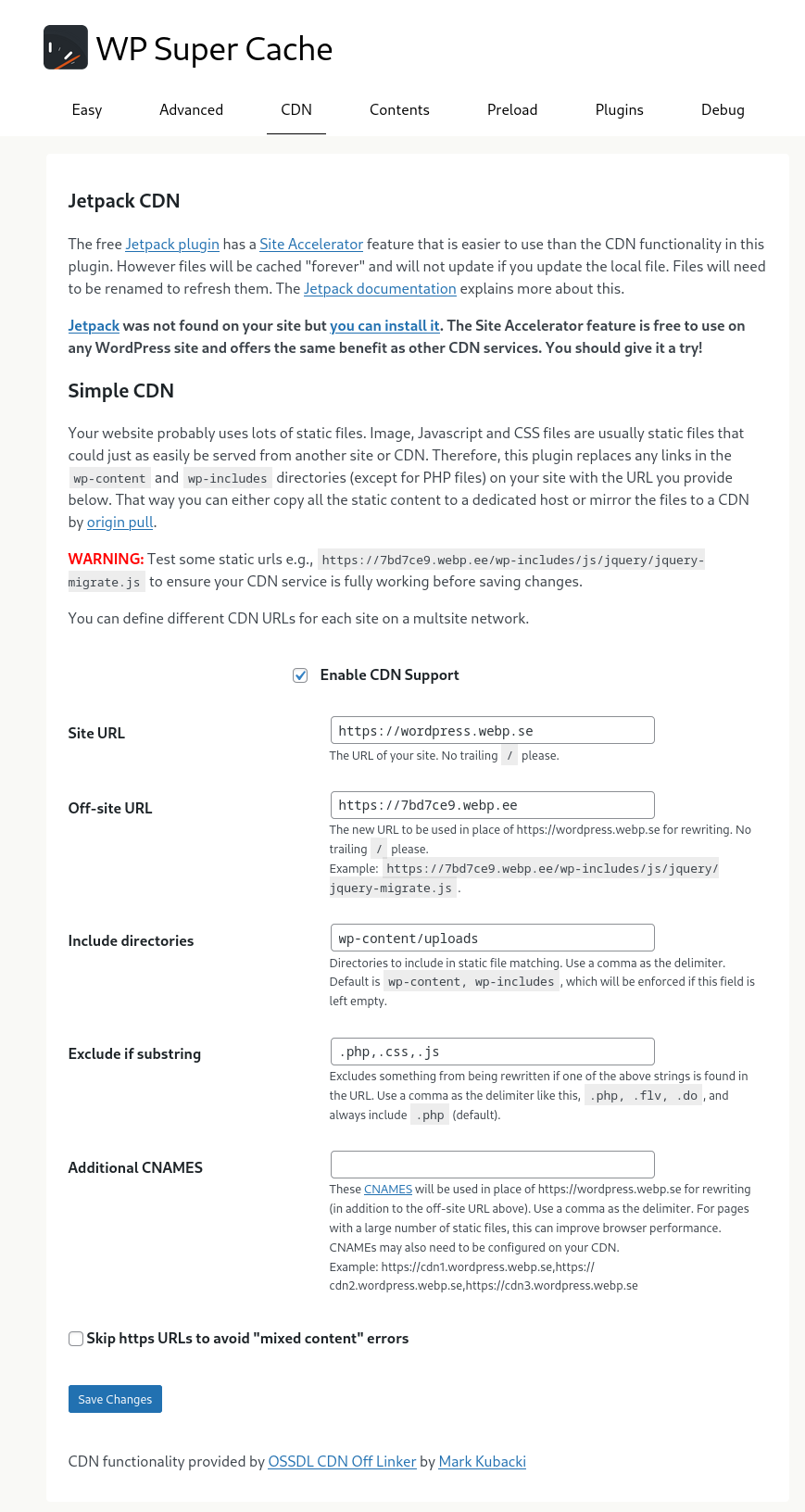
Please pay special attention to Include directories and Exclude if substring part, to make sure only images URL under wp-content/uploads are changed to WebP Cloud Services
In the configuration above, all images in posts and featured image will be changed accordingly, example site (with twentytwentythree theme):


Halo
You can use our Halo plugin at: https://github.com/webp-sh/halo-plugin-webp-cloud, super easy to use, more usage details is on that GitHub page.
Hugo
This method is contributed with ❤️ by STRRL
We are going to use "Markdown Render Hooks" to modify the way how hugo render the image as HTML.
- Create a HTML file
layouts/_default/_markup/render-image.htmlwith blow content:
{{ if site.Params.webpCloudProxy.enable }}
    {{ if site.IsServer }}
<p class="md__image">
    <img src='{{ .Destination | safeURL }}' alt="{{ .Text }}" {{ with .Title }} title="{{ . }}" {{ end }} />
</p>
    {{ else }}
        {{ $image_ext := index (split .Destination ".") 1 }}
        {{ if in site.Params.webpCloudProxy.convertTypeList $image_ext }}
<p class="md__image">
    <img src='{{ replace ((printf "%s%s" .Page.Permalink .Destination) | safeURL) site.BaseURL site.Params.webpCloudProxy.proxyUrl }}'
        alt="{{ .Text }}" {{ with .Title }} title="{{ . }}" {{ end }} />
</p>
        {{ else }}
<p class="md__image">
    <img src='{{ .Destination | safeURL }}' alt="{{ .Text }}" {{ with .Title }} title="{{ . }}" {{ end }} />
</p>
        {{ end }}
    {{ end }}
{{ else }}
<p class="md__image">
    <img src='{{ .Destination | safeURL }}' alt="{{ .Text }}" {{ with .Title }} title="{{ . }}" {{ end }} />
</p>
{{ end }}- Append the following content to
config.toml
[params.webpCloudProxy]
enable = true
proxyUrl = "https://vz4w427.webp.ee/"
convertTypeList = ["jpg", "jpeg", "png", "gif"]
- Then build your static site with
hugo
Reference:
- Hugo Markdown Render Hooks https://gohugo.io/templates/render-hooks/
Hexo
This method is contributed with ❤️ by Keshane
If you're using Hexo, you can try this:
- Install a package called
hexo-webp-cloud-proxymade by Keshane
npm install hexo-webp-cloud-proxy --save
- Then add the following content to
_config.yml:
webp_cloud_proxy:
  enable: true
  # the suffix of img type to use webp cloud service
  convert_type_list: ["jpg", "jpeg", "png", "gif"]
  # your site url
  pre_url: https://yyets.dmesg.app
  # webp cloud service proxy url
  proxy_url: https://vz4w427.webp.ee
  # the filter priority, see https://hexo.io/api/filter.html
  priority: 10
- Then build your website as usual
Nginx rewrite
If you are using Nginx for serving the webpages, you can add theses lines to your server block:
location / {
    sub_filter_once off;
    sub_filter_types text/html;
    sub_filter  '<img src="https://yyets.dmesg.app/' '<img src="https://vz4w427.webp.ee/';
    sub_filter  '<img src=https://yyets.dmesg.app/' '<img src=https://vz4w427.webp.ee/';

    sub_filter  '<img src="/' '<img src="https://vz4w427.webp.ee/';
}
Service Worker
Add the following script in <HEAD> section of your HTML:
if ('serviceWorker' in navigator) {
        navigator.serviceWorker.register('/service-worker.js')
            .then(function (registration) {
                console.debug('Service Worker registered success:', registration.scope);
            })
            .catch(function (error) {
                console.warn('Service Worker registered failed.:', error);
            }); // end navigator.serviceWorker.register
    }
Then create a file called service-worker.js under your website's root path, with content below:
const proxyUrl = "vz4w427.webp.ee";

self.addEventListener('fetch', event => {
    if (event.request.destination === 'image') {
        const oldSrc = new URL(event.request.url);
        const imageUrl = `https://${proxyUrl}${(oldSrc.pathname)}`
        const modifiedRequest = new Request(imageUrl);
        event.respondWith(fetch(modifiedRequest));
    }
});